Showing posts with label Others. Show all posts

How would Machine Learning Change the SEO Reality


In movies, the years around 2020 are usually shown as very futuristic, with incredible new technologies, humanoid robots, holographs, and so on. While we are still not quite there yet, some technologies, such as artificial intelligence and machine learning have already found a way into our lives, but in a much less dramatic way. For instance, Google has rolled out its machine-learning algorithm, called Rankbrain, less than two years ago, which has caused some changes in the SEO industry. Now, SEO specialists have become used to changes by now, since SEO has grown from simple keyword insertion and link building to providing great content, good user experience, and mobile friendliness, among other things.

In addition to RankBrain, which ranks as the third-most important SEO factor, there is also voice search. Those two alone have caused huge shifts in everyone’s SEO strategy, because you simply cannot ignore them. In order to help you navigate the ever-changing SEO landscape, we have analyzed all the ways in which machine learning will change SEO reality. Keep on reading.

1. Content Quality Will Become a Priority

Although this has been a claim for the past decade or so, it is about to become a reality. How so? Well, since 2015, Google has been testing a new AI technology called DeepMind. DeepMind analyzes natural language and enables AI to understand and learn like a human being. This means Google will pretty soon be able to tell whether your content is good or not. As SEOs, you should be less concerned about the technical aspects of SEO. Instead, you should focus on satisfying user intent. This means that your content need to give them the information or a solution they were looking for.

If your audience is diverse, your content will need to answer a wide range of problems for people which are vastly different, and are probably at different points of the purchasing process. This will not only affect the way you will need to phrase and write your content, but also how you will go about designing, linking, and structuring it, among other things. If your content does not succeed in this, AI algorithms will rank your page lower, probably within 24 hours.

2. Good User Experience Will Become Essential

Whereas the technical aspect of SEO will probably be of lesser importance in the future, user experience factors will definitely become more significant. Google currently analyzes factors like click-through rate and user engagement and views them as clear indicators of user experience. Higher click-through rates and engagement equal good user experience, but Google’s machine algorithm will continue to develop, which means they will be able to experience websites in the same manner as human beings do. As a result, artificial intelligence will be able to analyze user experience momentarily and rank it according to that.

According to SEO experts from MyMathDone, you will need to pay attention to UX weak spots. In addition to the two factors we have listed above, you will also have to make sure that your website’s loading speed is fairly quick. If a user has to wait for a long time in order to access your content, then Google will pick up on it and take it down a few notches in terms of ranking.

3. Links and On-Page Factors Will Not Matter as Much

Machine learning algorithms will be able to figure out a lot of stuff on their own. This means that factors like title tags, meta descriptions links, and alt text will not be as crucial as they are now. They won’t become irrelevant, but your SEO will depend on them a lot. You will no longer be able to come up with a strategy by going through a checklist of practices, which usually don’t include factors like content or design.

Google’s AI will also be able to identify websites which rely on black and gray hat SEO practices, and will either penalize them or remove them from the results altogether. Paid links will become easy to identify, as well. Even when it comes to organic links, which are the key ranking factor at the moment, the situation will be different. Because machine learning algorithms will be able to understand the content, organic links will no longer carry the same weight. Currently, they are more or less proof that your website features good content, but Google will be able to determine that on its own in the future.

4. Technical Aspects Will Be Handled by AI

Today’s SEO includes factors like sitemaps and robots.txt file, but in the next couple of years or so, it will become something that will be handled by machines. That isn’t to say that no human input will be required at all. Technical expertise will still be required, since Google is bent on having websites implement stuff like Accelerated Mobile Pages, voice search, and structured data. Voice search is blowing up right now, and if you want your content to show up inside the featured snippet, which is read by voice assistants, you will need to provide structured data.

Otherwise, AI won’t be able to do much without it. This means you will need to add a schema markup to your website. While that’s complex to do, you will see the benefits in the shape of better click-through rates and higher ranking. Technical knowledge will remain a plus, even though you won’t have to do all this technical stuff.

5. Visual Design Will Be More Valuable

Better design contributes to a more pleasant user experience in more ways than one. There is the subjective aspect of it, since people will perceive your brand or business as more reputable because of great design. But, there is the more palpable aspect, too. For instance, if you feature plenty of images, video, typography, or infographics on your website, they will become more engaged. Also, a subtle use of colors and formatting can make all the difference, especially on mobile devices.

6. You Will Need to Reduce the Number of Clicks

One of the things that counts toward a good user experience is least possible number of steps a user has to make before they can get what they came for. For instance, if you are having them jump through hoops in order to register to your website, they will most likely leave during the process. Also, you need to optimize your forms and online transactions, so that it takes only a couple of minutes for the user to finish the procedure.

7. Lower Costs

Lower costs usually mean good news, from a business point of view, but not if you are an SEO specialist in this case. Seeing as AI will be able to handle a lot of the SEO work on its own, less SEO personnel will be required. Communications will also become cheaper, as users will receive automatic emails, and read scheduled posts.

Conclusion

Thanks to machine learning algorithms, SEO is about to undergo its biggest change yet. While some of the technical stuff will become easier, it will become more difficult to provide a good user experience, and you won’t be able to outsmart algorithms anymore. But, as with any other new technology, there will be benefits you will be able to use to your advantage.

How to make profit through Bitcoins

If you’ve got money lying around, usually the best thing to do is invest it, to turn it into even more money. In fact, maybe the reason you own bitcoins in the first place is because you expect their value to go up, so you invested in bitcoin.

You might think of your bitcoin wallet like your bank account. You can access it from your computer or phone and send money with it. However, there is one key difference- interest. At least before the 2008 financial crisis, receiving interest on your bank savings was normal. Your bank was lending out your funds and sharing some of the profits with you.

Bitcoin can earn interest in the exact same way if you’re willing to let it out of your wallet.

The price of bitcoin more than doubled in 2016, and may well keep rising (on February 28th, you could trade 1 bitcoin for $1200 according to CEX.io exchange). But, you can earn even more by
investing and earning interest on your bitcoins. If the price does go up, you’ll have a nice double whammy investment with very high returns. Although, just like all investments, some are safe
and some are risky.

Here are some of the ways you can get started investing your cryptocurrency for profit.

Day Trading
Image Credits: 30btc.com
Day trading is a very popular way of investing, and not just for bitcoin. The foreign exchange market is huge, and there are thousands of companies that specialize in profiting from
predicting if the prices will go up or down.

The idea is to buy low, sell high. You can do this by selling your bitcoins when you think they are overvalued. Then, you just buy them back at a profit when the price comes down. As the price
of bitcoin is influenced by various factors, you need some experience to make predictions. If you can spot the trend and guess when it will pop, you can make a lot of money.

Some people are hugely successful at this and can double or triple their money very quickly. They do this by borrowing more money than they actually have to invest, amplifying their potential returns (and potential losses). But, unfortunately, most newbie traders aren’t successful. You need to get experience to make consistent, accurate predictions.

It’s a risky way of investing your bitcoins, but it can be fun with amounts you can afford to lose.

Lending Out Your Bitcoins
Image credits: coinjournal.net
I mentioned above that some traders borrow money to increase their potential profit from trading. Well, someone has to lend them that money.

That lender can be you. There are a few places you can do this easily, such as Magnr. You can store your coins with them, and share the interest they get from lending out the coins. A similar
service is bsave, who use the funds to help coinbase keep their daily trading operations running. These types of companies offer fairly low, but consistent returns.

If you want to be a bit more adventurous, you could try peer-to- peer financing on Bitfinex. It’s a feature that allows you to lend directly to traders. The loans are mostly high interest and short
duration, so there is a potential for good returns if you can lend consistently.

Be careful handing over large amounts of your bitcoins to any company. Make sure they have a good reputation and have some sort of guarantees you’ll see your money again.

Becoming a Local Bitcoin Broker
If you’ve got a bit more time on your hands, another option is to become a local bitcoin broker.

Ever notice that on a bitcoin exchange (or any currency exchange for that matter), the price to buy is slightly different than the price to sell?

This is called the ‘spread’, and it’s how brokers earn their money. They don’t hold any currency for very long, but keep trading it back and forth, earning a small margin of profit from every
transaction.

To do it yourself, you’ll need to find someone who wants to buy bitcoins in your area. Then, rather than sell to them at the market price, you sell to them at slightly above the market price
(say, an extra 5-10%). Now, try to do the same in the other direction - finding someone wanting to sell bitcoins, allowing you to buy them back at a lower price. Congrats, you just made a profit!

Of course, the volatility of the bitcoin price can make this risky, but there are many people making money this way.

Cloud Mining
Image credits: coinstaker.com
Bitcoin mining used to be one of the most profitable ways to spend your computing power. Many of the early bitcoin miners are now millionaires.

Since then it has become much more difficult. These days, you need overpriced bitcoin mining hardware, an extremely cheap electricity bill, and strong technical knowledge just to get started.
And, as the best place to get cheap hardware and electricity is China, that’s where you’ll find most of the profitable bitcoin mines.

There is a way to get a piece of the action, however, no matter where you are. Bitcoin miners need a lot of upfront investment to buy the land and computing power to get started. This opens
up an opportunity for you to lend your bitcoins to one of these mines, in exchange for a percentage of future profits.

Some of the options include genesis mining and hashflare. Be careful, though. Make sure you are going to actually make a profit on your investment, and that your coins are safe. Things change quickly in the blockchain world, so do your research.

Managing Risk
Any interest you earn is always a reward for taking a risk. As we learned in 2008, even putting money in a bank account is a risk.

The safest place for you bitcoins is in your own personal wallet or cold storage. But, if you are feeling lucky, you can try some of these methods to earn even more profit from your bitcoin
investment.

Got a more cooler way to earn through Bitcoin? Drop your thoughts in comments below!

Credits:
Mary Ann Callahan (Guest Post)

[FIX] VMware authorization service not running. Cannot connect to the virtual machine Error.

VMware

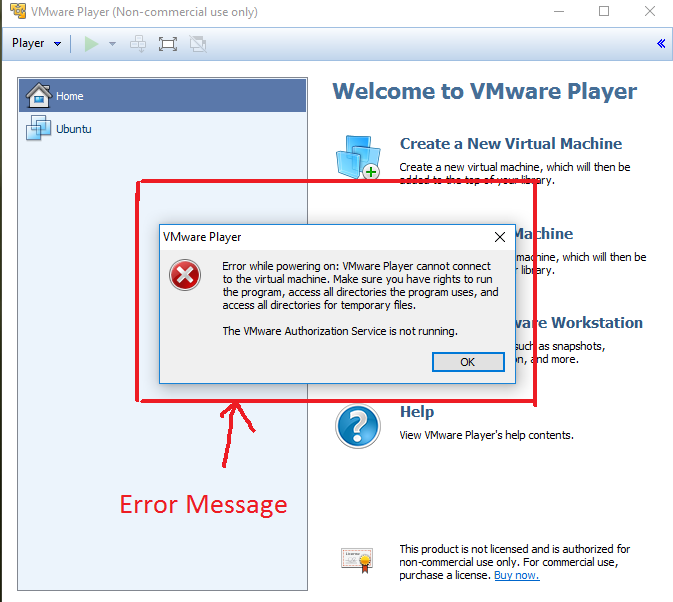
This is an error we get sometimes in VMware. The error message is "VMware workstation can not connect to the virtual machine. Make sure you have rights to run the program, access all directories the program uses, and access all the directories for temporary files. The VMware authorization service is not running".
And this is the snap of the error,
error mesage

So here is the fix,

Follow the steps:

Step 1: Press "Windows button+R" in your computer. This should open the "run" dialogue at the left bottom of the screen. Type "services.msc" here and hit "Enter'.
in the run menu

Step 2: This should open up a window listing all the services present in your computer. Scroll down to find a service named 'VMware authorization service'. Right click on the same and click on 'Start' as shown in the image below.
start the vmware auth service

Step 3: After it shows 'running', you may exit the services window and reopen VMware. Select the Virtual OS you want to boot and it should now properly boot!
booted successfully

Booted? Then cheers! Drop a comment about what more articles you want to see in this blog.
Did not boot? Drop a comment below describing the issue.

Watch video tutorial on how to fix this error

Bitcoin: All you need to know about this Digital currency!

Bitcoin
You might have heard many currencies of many countries. Their exchange values go on changing daily according to the import/export of the country. All these currencies have physical existence, have banks to be stored in. But then there is this virtual currency called as 'Bitcoin'. I'm sure not all of us know about this digital currency. But when i did research on this, I was amused, amazed and what not?. The concept of Bitcoin is just mind-blowing. In this post, I'm going to put a brief version of the same research. Spend just 10 minutes of your time and I assure you it wont go waste. So let's begin.

At the end of this post, You will know:

  • What is Bitcoin?
  • History of Bitcoin currency.
  • How does Bitcoin work?
  • About Bitcoin wallet.
  • How to Earn/Buy Bitcoins?
  • What are the Pros and Cons of Bitcoin?
  • Some facts about Bitcoin

What is Bitcoin?
Bitcoin is a form of digital currency. But with 'NO physical existence'. It is virtual.
It was most uncommon form of currency but in the year 2013, it raised from a 1 Bitcoin=13$ value to a unbelievable value of 1000$. As of today, the bitcoin value is 640$ USD (which is 42696 INR).
Only 21 million Bitcoin will ever exist in the world. which means its value will keep on increasing as it keeps on becoming 'rare' in the world.
Bitcoin value as of October 2016
It is a form of electronic money on which Government or Bankers have NO control of.
Difference between Bitcoin and normal currency is that, The value of Normal currency is governed and regulates by a central bank of a country and depends on amount of Import/Export of goods from that country with other countries. But, Bitcoin's value completely depends on People's confidence on Digital currency. Which means, as the number of people believing in Bitcoin currency increases, its value increases.

Where can you use Bitcoins?
You can use bitcoins with sellers who accept digital currency. Moreover, since Bitcoin is digital, it helps in successful online transactions too. Bitcoins are a quite attractive proposition if you are looking forward to the settlement of International transactions.
As a fact, even Lamborghini automobiles accept Bitcoins as payment method. 

The huge success of Bitcoin inspired the launch of new cryptocurrencies like ppcoin, freicoin, litecoin, dogecoin and so on.
This currency is still not common in trade and most people even do not know about this. But according to me, it is completely safe and reliable software based online payment system. Its a digital currency which can be used for payments in exchange of goods.

Some information about Bitcoins:
  • It is digital. There is nothing to hold as a piece of metal or paper.
  • It is peer-to-peer controlled. Which means only sender and receiver has control of this transfer. No intermediate banks or agents.
  • The transactions are visible to people but all they will see is a bunch of digits and alphabets which doesn't make any sense (Cryptography).
  • The transfer of bitcoin is completely Encrypted, which means even if someone sees the transfer taking place, no one can decrypt/hack it without the key which only sender and receiver will be knowing. A new level of safety.
  • Many sellers/dealers are implementing Digital currency to reduce investments on actual currency processing.
  • There is no consumer protection for this currency. It is completely depending on Trust and belief. Which means seller need not send you product for which you have paid through bitcoin. and you cannot officially raise a complaint on that. 
  • Some countries have even restricted bitcoin for the same above reason.
How does Bitcoin work?
To know it better, Watch this video below.


Bitcoin wallets:
These are some online wallets like PayPal to store the Bitcoins you have earned. You can Buy/Sell/Trade Bitcoins from this wallet (this depends on whether there is support for the same in your country)

Create your first Bitcoin wallet now
After login, you will get this screen
See 'Wallet address' in the picture
  • Click on 'Wallet address'  which is at the top right corner of the Homepage.
  • You will get a wallet address like this
Wallet address
  • You will need to use this address to Buy/Sell/Trade Bitcoins.

How to make money using Bitcoins?
There are Four methods to make money on Bitcoins.
  1. Invest in Bitcoins
  2. Get free Bitcoins
  3. Bitcoin mining
  4. Sell products for bitcoins
  5. Invest in Bitcoins
1. Invest in Bitcoins
  • Simple Method.
  • Buy Bitcoins and sell them at higher prices.
  • Doesn't need much technical skills.
  • Buy Bitcoins from CoinBase and earn 10% extra bonus (only through referral link- click here).
  • You can refer to any users using your referral link from your coinbase account. This will get you 10% Bitcoin earnings for every 100$ worth of Bitcoin purchased from your referral link.
2 .Getting free Bitcoins
  • This requires you to do some task so that you will get Bitcoins in return.
  • Tasks involve some actions like Clicking or Viewing Ads or working your skills/resources for bitcoins.
  • There are some websites designed for the same.
  • FreeBitco is a website where you can earn bitcoins by just playing lucky number games. Visit FreeBitco ( you will get 0.00000001 BTC for joining using this link.)  
  • Lucky number game can be played once in 60 minutes (see picture below)
    As simple as this

Other websites to earn Bitcoins:

  • BitCoinTalk is a forum which helps you search for jobs that earns you Bitcoins. Many jobs here can be completed in short amount of time and hence you can earn Bitcoins easily (visit Bitcointalk)
  • Visit Reddit r tag 'Jobs4bitcoins' and find some tasks suitable for you.
  • Bitgigs also provides same functionality.
3. Bitcoin Mining
This method is quite complex. But this infographic below, helps you understand it with ease.
credits: bitcoinmining.com
Read exact article of Bitcoin mining at 'Bitcoin Wiki'.

4. Selling your own products with bitcoins:
  • With this method, you can sell products to customers in exchange with bitcoins. This is normal way of trading but with the exception that currency is digital.
  • Learn how to accept bitcoin for your business, click here.

At last, 
Pros and Cons of Bitcoin currency
Pros:

1. Low transaction fees
Since there are no intermediate payment processing systems, transaction fee is less or sometimes zero.

2. Bitcoin is deflationary
Since only 21 million bitcoin can ever exist in the world, its value will keep on changing but not amount of bitcoins.

3. No Taxation
No tax charges for international transactions since Givernment or Bank have no control over it. A very huge advantage

4. Privacy
Since Bitcoin transactions are encrypted, it gives privacy to transactions.

5.Simple to use
Obviously.

6. Bitcoin is not regulated
No Government has rights over bitcoin and hence it cant be regulated through them. only allowing in country is depending on the Government.

Cons:
1. Bitcoin requires some learning.
Since it is not like any other currency, a person dealing with this should have certain knowledge of the same. By reading this post, I hope you got most of the information about this digital currency.

2. Not accepted in many places
Since bitcoins aren't yet popular, this currency is not being accepted in many places now. however popularity of bitcoin is increasing day by day, this will be rectified soon.

3. Time consuming.
Its easy to obtain but at the same time, time consuming too.

4. Transactions can be slow at times
since this is peer-to-peer transactions, when more number of transaction take place at the same time, timer for some transactions may expire and the same can fail sometimes.

5. Bitcoins can be stolen.
As this data is digital, and stored in some online databases like wallets, there is a possibility of these being stolen. so choose bitcoin wallets wisely. CoinBase is a safe and trusted wallet.


That is all about Bitcoin. Share this article with your friends and popularize this currency. Let me know your thoughts about this article in the comment section below :)

Credits:
Prashanth sachan, Dolan for inspiring me on this currency.


What does YouTube do to your uploaded video?

youtube upload logic
YouTube, as already mentioned in the previous post, is a video giant which has videos for almost anything in the world. YouTube is very big. How big? Well, if you were to watch all the videos of YouTube starting from now (year 2016), by the time you finish watching all the videos, it would be 2081 (75 years of videos OMG!). Yes. YouTube is that big and still expanding. It's a Google statistic that 400 hours of videos get uploaded to YouTube in a single minute. Heavy isn't it?
YouTube engineers say that any kind of video that comes from any random camera in the world has shown up in their system. The question is upon receiving loads of such videos each minute, all of them varying in resolution, size, etc. What does YouTube do to them so that everyone across the globe can experience a optimized flawless video playback?. I have done some research from videos of "Nat and Lo 20% project" and here is the brief report of the same.

What does YouTube do to your video after you upload it?
YouTube produces all possible video resolution version of your uploaded video and finally results in something that anyone can watch it in any possible screen and bandwidth. Because if YouTube plays the video in the same format you uploaded, it would cause constant buffering in low bandwidth networks. To avoid this from happening, YouTube does something called as 'processing' after you upload a video.
After you upload a video, youtube examines the resolution, frame rate of the video and decide on how it can be cut into small slices (read the previous post to understand the concept of slices). After examining, a high resolution video of your upload will be created, YouTube calls it 'Mezzanine'. This Mezzanine is then cut into smaller pieces of videos, say each of 5 seconds. Then each piece is passed to a different machine where some algorithms are performed which results in different resolution videos(1080p,4k,720p,480p,360p etc)  of your upload. Then all these smaller pieces are assembled together and a final piece is produced. Around 25 different resolution videos are produced for an uploaded video.

What's the benefit of this mechanism?
If you upload a 4k video, and someone with 4k Television tries to access your video, original video will be played for him. someone with a 1080p device will be provided with a bit of lower resolution video. Which will result in an efficient and flawless playback.

How does YouTube make all these smaller resolution video?
This is where CODECs come into picture. CODEC stands for 'Compression and Decompression'. A video is considered as a bunch of dots (pixels). when you do so, some dots in the frame looks similar.
To put it in other way, Consider a video where a person is talking and there is a wall behind him. In the video, wall is constantly at the same place. Only the person is moving. So the pixels of the wall need not be refreshed each second. So that part of the video where the wall is present is regenerated accordingly without using new pixels. This shrinks the video size. If you have observed, videos with constant screen changes has larger sizes compared to a single screened video :P

What else YouTube does to your video?
Along with processing, it also tries to generate a suitable thumbnail to your video using some algorithms. Also for some videos, voice recognizing takes place to generate automatic subtitles for that video.

All these tasks goes on running for thousands of videos simultaneously.
YouTube does many things besides simply playing videos for its clients isn't it?
If you liked what you read, share it with your friends. Keep visiting for more such content. ;)

What happens when you play a YouTube video? (Complete YouTube video playing logic)

youtube buffering logic
YouTube! A very great and popular community indeed. Many people watch many videos in YouTube. Some of you even do possess a YouTube channel where you publish your content. Overall, YouTube is a very large database of video content from which you can browse videos right away through any of the browsers. I'm sure most of you do that too.

Well, the point isn't that. My topic in this post is "How are the YouTube videos played in a client's computer when he/she tries to access it?".

Let me get to the matter now.
You might think that when you press the 'PLAY' button, YouTube just grabs the video from its server and plays it for you. TRUE! but this used to happen 10 years ago. At those times, YouTube would simply download the entire video file and play it for the client. But now, things have changed, Technology has improved, Computer intelligence has leveled up. Now videos are being played based on a whole new level of logic. YouTube calls it 'SliceBread'. As explained by the YouTube engineers, it is a metaphor for playing the video as smaller parts and load the next part when the current part is being played.The size and resolution of the next part of video will depend on the available network. This method is named as 'Adaptive bitrate' by YouTube.

To be more specific, When you play a video, YouTube analyses your situation (your network's situation), something like 'is your network good?','Whats your screen size?', 'How much have you played already?' etc. So if you have a High speed network and a high resolution screen, YouTube may play a 1080p piece of video for you. While playing the video, you may start downloading another file(assume). Now the bandwidth is constrained. So YouTube will provide the next piece of video with a lower resolution, say 480p (to reduce the possibility of buffering). If your bandwidth is still lower, then the video would buffer for a short time and then it would continue the playback.
This is one way of playback optimisation. There is another way of speeding up Video playback from YouTube which it calls 'Content distribution network'.

Some temporary hard drives are stored with most popular played videos of YouTube(most viewed ones). These hard drive racks are arranged in the lower level of the architecture and Google's central servers are placed at the top. When you search for any video, YouTube first searches these temporary hard drives whether they have that video or not. If they don't, then YouTube will continue the query to the way top to Google servers. Then You get the video(of course all these within a fraction of second). This way, frequently played videos are accessed faster.
This way, YouTube rocks the Video websites category and is still expanding its reach to the people. Hats off to YouTube which allows users to play all kind of videos absolutely free.

If this post was helpful to you, share this with your friends. Drop a comment if you have any thoughts. Good day :)

5 cool tricks to increase your computer's speed

speed up your pc
There are some instances when your computer works very slow. Opening an application may take longer than usual. At that instance you will want to increase the speed of the PC but you probably might not know the reason behind slow operation of the system.

Well most of the times PC slows down because of the high burden on its RAM. When RAM is filed with too much temporary files, there wont be much space for new incoming tasks. As a result of which, you may feel the lagging experience. Here I'm going to tell you about a trick to clean the temporary files by which you may experience a bit faster system.
Ill be explaining 5 tricks here. Two of which i came to know from my friend. Ill be sharing it here now. These tricks work on any version of windows.

1.Ready Boost : Increase PC's RAM.
Yes. You can logically increase your PCs ram very easily. You can use a USB flash drive for this purpose. PC will let you increase its logical RAM to twice its original capacity. (i.e., If your RAM is of 4GB, you can use 1 8GB pen-drive to increase 4GB RAM more by dedicating 4GB of USB's capacity for this purpose).

Windows lets you only to double the RAM logically. If Your PC has 4GB Ram you can make it 8GB with this method. Obviously this increase RAM method will not give you fantastic experience because Read/Write speeds of USB are far less than real RAMs. You can still use this method to experience at least a bit of faster operating.
Some frequent cache files will be made to reside in the increased RAM thereby increasing operating efficiency.

Follow these steps to increase RAM.

  • Insert a USB drive which you want to act as RAM. Right click on USB's icon in 'My computer' and go to 'properties'.
  • Select 'ReadyBoost' tab out of many tabs(see image). 

readyboost menu
  • Select the size of increase and select any of the options given in the ReadyBoost menu and click 'OK'.(see image). 

readyboost processing
  • After some loading, your logical RAM is ready. You can use this RAM while gaming, to feel a bit lag less play. 
  • To revert back to normal USB once you are done, just go to Readyboost menu of USB and select 'Do not use this drive' option.
delete this in usb to revert back
Cool isn't it?
 
2. 'MSCONFIG' startup manager.

In this trick you will be disabling unnecessary startup application that you may not have any use of. Thereby reducing burden on RAM during startup.
Follow the steps:
  • Open 'RUN' window by pressing 'Windows+R'.
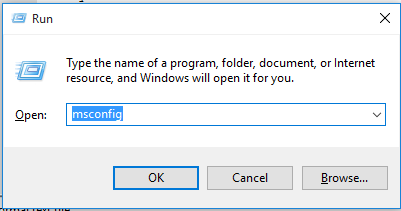
  • Type 'msconfig' and hit enter.(see image)

msconfig
  • A window should appear. Here you need to select 'Startup' out of many tabs on the top. 
  • Disable the ones that you feel are useless.(see image)

startup manager
  • Next time during PC startup, these wont start automatically. 
[IMPORTANT]: Dont perform the 3 tricks below during any file transfers are going on in your PC. Doing so may cause the transfer to stop immediately.

3. '%temp%' folder
This folder in your windows drive contains all the temporary files your windows has previously used. These are just a burden to the RAM and is of no use to you. To clean up these files, follow these steps.
  • Open 'RUN' window by pressing 'Windows+R'.
  • Type '%temp%' and hit enter.(see image)

type this
  • A folder will be opened. Grant permission to 'continue' if asked. 
  • Then select all files by pressing 'ctrl+A' and hit 'shift+delete'.
Hurray! RAM is optimized now.

4. 'temp' folder
Similar to the previous one, this too is a folder for temporary files.
To clean up these files, follow these steps.
  • Open 'RUN' by pressing 'Windows+R'.
  • Type 'temp' and click enter.(see image)

type this
  • A folder will be opened. Grant permission to 'continue' if asked. 
  • Then select all files and delete them permanently.

5. 'Prefetch' folder
This folder contains the files which are fetched and placed in RAM before execution. Such as while copying files etc.
To delete them,
  • Open 'RUN' by pressing 'Windows+R'.
  • Type 'prefetch' and click enter.(see image)

type prefetch in run
  • Select all files and delete them permanently.

All these above told steps will reduce the burden on the RAM and increase the free space on the RAM which may possibly result in a faster PC.
Perform these tricks often to enjoy free RAM and hence faster beast.

If you have any more cool tricks, do comment below. Share this with your friends to spread these cool tricks.

[Credits:Prefetch,%temp% : Ashish S Shanbhag]

Verne The himalayas : Google's himalaya based educative game

google's verne
Google is known for its creative tech stuffs. Now its heading for something more cool. Google today released a game for android, in which a player can roam The great Himalayas in his mobile phone. Its more of a simulation kind of game. Google named the game as 'Verne: The Himalayas' and currently it is only available for android users.

Its not too late that Pokemon Go, a game which is based on GPS mapping was released. It got a massive hit after the release. And this time, it is Google who's going to rock the market with this new game. With a huge 3d mapping of Himalayas, it gave a simulation touch to the game. But the thing is Unlike Pokemon go, Google's game doesn't need an active Internet connection. You can roam Himalayas staying off-line.

About The game:
In this game, a player can roam around the greatest mountains of the world 'The Himalayas'. Player is simulated by a 500 foot yeti called as 'Verne' which probably is the reason for naming the game. 

Built using Google's 3D maps imagery, Game lets you run atop Mt. Everest, hang glide, skate across icy lakes, Chase animals, Ride a jet pack and much more.
As the character Verne moves along in the game, Famous locations of The Himalayas come into picture. Famous landmarks, religion and much more are highlighted in the game educating the player about Himalayas geography.
In real life, very few get the chance to visit The himalayas and Google has made ir easy. Thanks to Google.

watch official Game video

In an official statement, Google said "For years, Google Maps has been adding 3D imagery from all over the world - New York City, the Grand Canyon, Mont Blanc, and more. A few of us started wondering if this 3D imagery could make learning about the world a bit more fun for kids. We started playing with quick prototypes, and even brainstormed with our own kids to get inspired by their sense of curiosity. Our idea became a new, experimental app called Verne: The Himalayas. We're excited to share it today as a fun way for anyone to take a summer trip to the tallest mountain range in the world".

For now, Google has released simulation game only for The Himalayas. We expect more such simulation games to be released by Google. Currently app size is 213mb and works fine on Android 4.4kitkat and above platforms. iOS users haven't got the game yet.

The game has got a good review so far and i think its worth a try. Have fun with the game. You may download it from Google play store.

Where does the deleted files go? How they are recovered back? :The complete file deletion logic

file deletion logic
Consider a situation. You have a file, video or audio. You are bored of that file and you delete it to save some space on your device. Hurray, the file is deleted successfully. But, its actually not. Here's how.


Its a common question in most of the minds that "where does the deleted file really go?". Today I'm going to give you some idea of what will actually happen after a deletion.


Step 1. Simple deletion
If a file is selected and 'delete' button is pressed, that file is simply moved into some location in your PC. References to that file in your PC still exists. The same can be seen in The Recycle bin. If you had deleted any file by mistake, you can go to recycle bin and simply 'restore' the file. So simply pressing 'delete' may make you feel that file is deleted, but its still in recycle bin.

Step 2. Complete deletion.
Now if you feel that you permanently don't want the file. In this case you can 'empty the recycle bin'. The file is so called 'permanently' deleted. and you can see the freed up space on your disk. Now the question is, where did it go?. "Did it escape from hard disk port?", "Did it dissolve?", "Did it evaporate?". Nope. Its still in the same place where it was before. Only thing is All the references which were pointing to that file are deleted and freed up so that those memory locations can be refereed to by some other file. Which means, until you fill in any other file in that freed up space, the deleted file is still there. Only thing is that there is no one left to refer to that file. Its simply a bunch of 'orphan data' now. It is deleted only when there comes any new data in that free space.

The file deletion logic.
Windows uses Master file table(MFT) as an index to the files it stores on the hard disk drives.When you permanently delete a file(shift+del method), it is easier for windows to mark the file's MFT record as 'deleted' instead of overwriting the real file itself with null value. so the file is simply left in the drive but it doesn't have any reference in MFT table.

Then the question is "Can we recover those orphan data?". Answer is Yes. Next question will obviously be "How? When there are no references left to those orphan data?".

Here's how!
There are some softwares for windows platform to recover permanently deleted files from the disk drives.  (Example: Recuva)

When you delete a file, windows doesn't overwrite the MFT entry with 0's until it needs to reuse the space. It simply marks the entry pf MFT record of that file as 'deleted'.  these softwares scan for MFT entries marked as 'deleted'. Since MFT entries for deleted files is still not overwritten, it contains the information of the file (including size of file, and where it is stored in hard drive), these softwares list such files and help you recover them by unmarking them from label 'deleted'.
There are also deep scan mechanisms which search each block of data in hard disk for beginning of a file(which contains info about type and size of the file) and recover the same. But only thing is recovery can be done if file is 'not fragmented' or not stored in parts.

As a tip for better recovery, It is better to use these softwares as soon as you realize that the file has been deleted. Because windows, when in need to create new files, will delete the MFT entries marked with 'deleted' to make room for new data. Which may result in permanent deletion of data.


I hope the doubts are cleared by now. If you have got anymore questions, drop a comment below. I would love to make research on them and answer them. Share this with your friends and spread the knowledge.

10 best music players for android: Now enjoy beats with more fun

top10 music for android
Music is of course an integral part of our life. It vanishes your sadness, bad mood, and makes you feel relaxed. It will be more fun to listen music with a more enhanced music environment. If you own android device, in this post I can help you find some Cool music players you should give a try.
So Here's my collection of Top 10 Music Players for your android devices
[Ratings in this post is completely based on my experience with these apps]
Lets begin.

10. FlipBeats Music Player
Developer: hSenid Software intl. ltd
Compatibility: Android 3.0+
Availability: Free 
flipbeats
In the 10th position, we have this music player. This is an innovative player which relies on gestures for navigation and has a good looking interface. This app brings you a customized and professional music experience.
This app features some interesting things like Gesture based Flip UI, Bass boost, multi band equalizer, pro Equalizer, spectrum and waveform analyzer, lyrics support and much more. This app also features shake control for music. Good thing is this app is free in play store.

Download from Play Store


9. Google play Music
Developer: Google inc.
Compatibility: Varies with device
Availability: Free
google play music
This is another music player which offers many features. It comes with material UI. This app is for those who want Google cloud and online music content all in one app. Its main feature is you can move your music to your cloud and listen to it from anywhere. This app also contains a simple but useful Equalizer for audio customization.
Since Google develops this app, we can expect timely updates for this app with more and more features. 

Download from Play Store


8. Rocket player
Developer: JRT Studio
Compatibility: Varies with device
Availability: Free with in-app purchase
rocket player
This is a much loved music player on the app market. App has great audio codex support and many more unique features like chrome-cast support, tag editor, custom lock screen. You will get many more premium features if you purchase pro version of this app.

Download from Play Store


7. Neutron Music player
Developer: Neutron code ltd.
Compatibility: Android 2.1+
Availability: Paid
neutron music player
This is one of the highest rated music player with no Nonsense stuffs in it. Every single feature of this player may be fruitful to its users. Only drawback someone may find would be the dull UI.
This app offers high quality 32/64 bit sound rendering with enhanced audio decoding and processing. It supports large number of music file extensions, supports DSP support, audio gain, gap less playback, phase inversion and much much more.
I hope the developer redesigns the UI to match Material UI standards in the coming updates.

Download from Play Store


6. n7Player music player
Developer: N7 mobile Sp.
Compatibility: Andorid 2.2+
Availability: Free & paid
n7 player
This is an unique music player with wonderful homescreen. The interface is cool with different ways to navigate through the songs.
It also has loads of features like 10 band equalizer, 3D sound effects, lyrics support, tag editor, sleep timer and a lot more. This app supports lot of music formats and is easy to use. Buy Pro version of the app to get many more premium features. You will get all premium features for free for 10 days in the free version of the app.

Download from Play Store


5. Equalizer+ music player 
Developer: DJiT
Compatibility: Andorid 2.3.3+
Availability: Free with in-app purchases
equilizer+ player
As the name suggests, the highlighting feature of this app is it's enhanced Equalizer. It has a 5 band audio and frequency equalizer with 10 equalizer presets. Other notable features include bass control, music search, music visualization, background play and many more.
This app is free in play-store with in-app purchases which unlock bass boost, fade, dual screen and many more. 

Download from Play Store


4. Musixmatch music player
Developer: MusixMatch
Compatibility: Andorid 4.0+
Availability: Free
musixmatch
Simple music player with lots and lots of features. Features lyrics support, karaoke mode, 6 band equalizer with some presets, Lyrics Card feature, Music Identifier, sleep timer, song info editor and much more. But consumes a bit of more RAM which may result in laggy android with devices having less RAM.


Download from Play Store


3. Player Pro music player
Developer: BlastOn SA
Compatibility: Andorid 2.0+
Availability: Free & paid
player pro
It has been a solid music player for a long time in the app store. If you are looking an app to play both music and video, this must be your choice. This app can play both audio and video. Features 10 band equalizer, Custom lock screen, lyric support, bass boost and a lot more.
Comes in both free and paid versions in the store. Paid version features more premium features.

Download from Play Store


2. Shuttle music player
Developer: SimpleCity
Compatibility: Andorid 2.3+
Availability: Free & paid
shuttle player
Simple music player with material design and lot of features like optimized performance, equalizer, song info editor and a lot more. Also includes theme support which can be used to make user player look unique. Pro version comes with some extra features like folder browser and more.

Download from Play Store


1. PowerAmp music player
Developer: Max MP.
Compatibility: varies with device
Availability: Free trial & paid
poweramp
This app surely deserves number one position because of it's feature rich package and small size of around 6MB. It would take a full article to tell the features of this music player. We will tell you some notable features of this app. Those are stereo expansion, 10 band optimized equalizer, cross-fade, gap less playback, dynamic cue, theme support for customization and lot more.
This app comes with a free trail of 15 days, which brings you all the features to try and decide if you want to buy the app or not. This is a must try music player for music lovers, Especially DJ lovers <3

Download from Play Store


Let me know if I missed any worth music player!


Credits: images- various websites and Google